
How teachers stay in control of AI marking

"Does AI marking actually save you anything, or does it just move the work?"
A teacher asked it that way, and it is the right question to ask first.
Most teachers who have tried an AI marker know the failure mode. You rewrite a comment it got wrong, the tool runs again, and your rewrite is gone. So you fix the same sentence twice. From then on you are supervising the thing that was supposed to save you the time, and supervising thirty of anything is no saving at all.
So the test is a narrow one. When you change what it wrote, does your change stick?
The honest answer starts at 33.5%
Researchers at the University of Georgia measured how often an AI model landed on the same mark as a human marker. It was 33.5% of the time. Give the model the teacher's own rubric and separate work puts it above 50%, and names the ways it still goes wrong: an incomplete rubric makes it overvalue neat presentation, an unusual-but-correct answer gets punished, and multilingual writing gets marked down for being multilingual.
A third is not a marking tool. A third is a second opinion you have to check, thirty times, and checking thirty is the job you already had.
That number is why nothing in Zippy says it marks your class. It drafts. You mark. The saving is real and it lives in one specific place: the first pass, the hour of reading thirty pieces and typing thirty sets of comments from nothing. Everything after the first pass is a judgement, and we have spent this release making sure the judgement stays yours and stays put.
Four places it goes in.
1. Your rubric goes in first, and the criteria on screen are yours
Zippy marks against the criteria you gave it, in the bands you named. Content & Ideas, Language accuracy, whatever your centre calls them and however many there are. It does not carry a house rubric of its own and quietly apply that instead.
This is the mechanism the rest of the post rests on, and setting it up is the last section. The difference between an AI marker that agrees with you a third of the time and one that agrees with you half the time is whether it was given your criteria before it read anything.
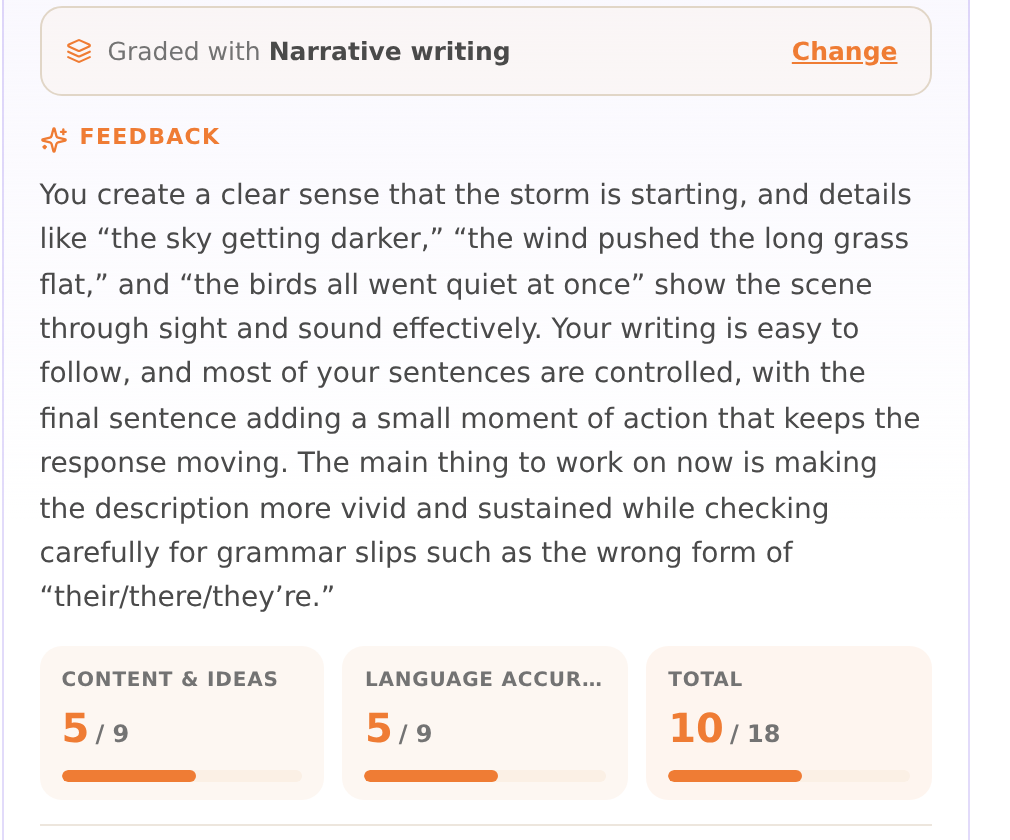
The top of the evaluation names the rubric it marked against, Narrative writing here, with Change beside it. The bands underneath are that rubric's criteria, not ours: 5/9, 5/9, 10/18.
2. The first pass is Zippy's. Every mark on the page is editable
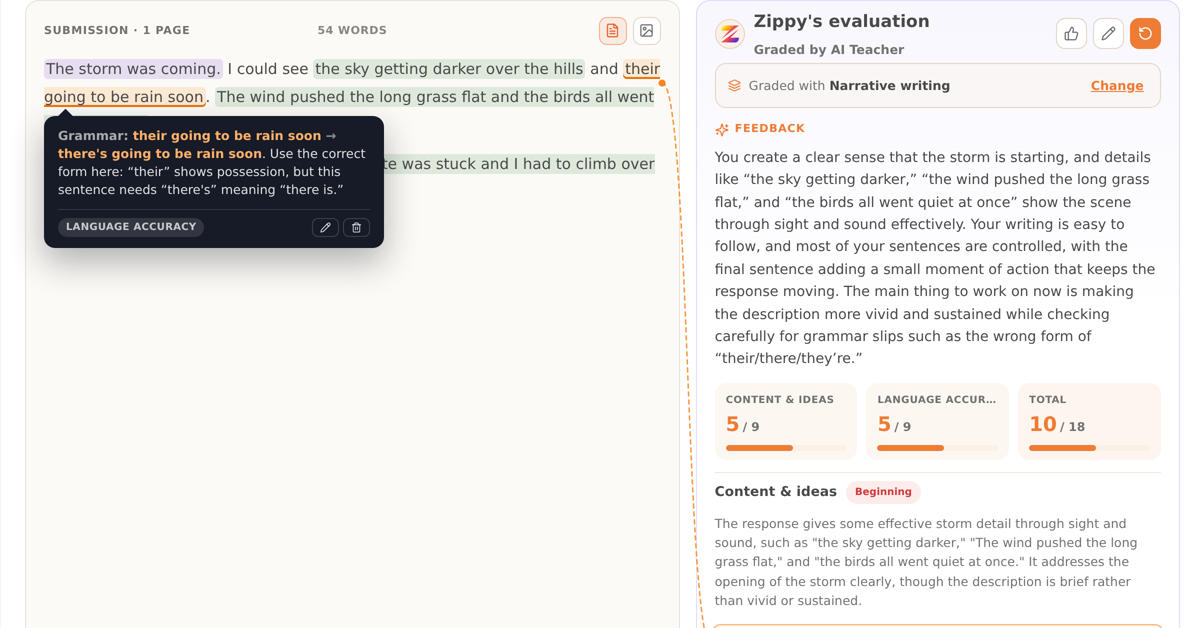
Click any highlight on the script and the comment behind it opens: what Zippy thinks is wrong, the suggested rewrite, and which criterion the note counts towards. Change the wording, change the suggestion, or delete the note. Edit and delete sit on the annotation itself, where you are already reading it.
Editing or removing an annotation never moves the score on its own. The score moves when you edit the score, or when you ask for a re-grade.
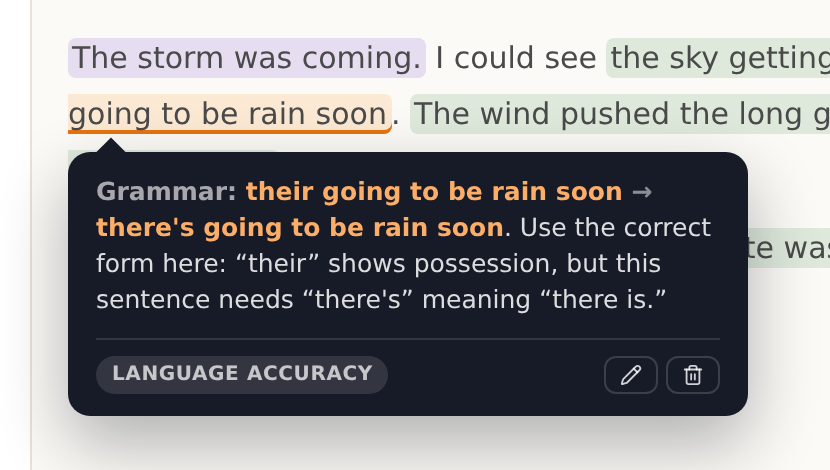
The note on "their going to be rain soon", tagged LANGUAGE ACCURACY so you can see which criterion it counts towards. The pencil and the bin are on the note itself.
3. What you decide survives the next run
This is the one that decides whether the rest is worth anything. Re-grade is a button you press: it costs half a credit and it never runs by itself. When it runs, your corrections go into the marking rather than being wiped by it. Where Zippy still disagrees with something you changed, it records the disagreement beside your value instead of applying it. Your number stays on the page. Re-grade a class of thirty and you get thirty records to look at when you feel like it, and no dialog boxes to click through.
Undo is real in the other direction too. Every field you edit carries an EDITED chip, and the chip is the button: click it and Zippy's original wording comes back exactly as written, because it was stored the moment you changed it. There is a Revert all for the whole piece.
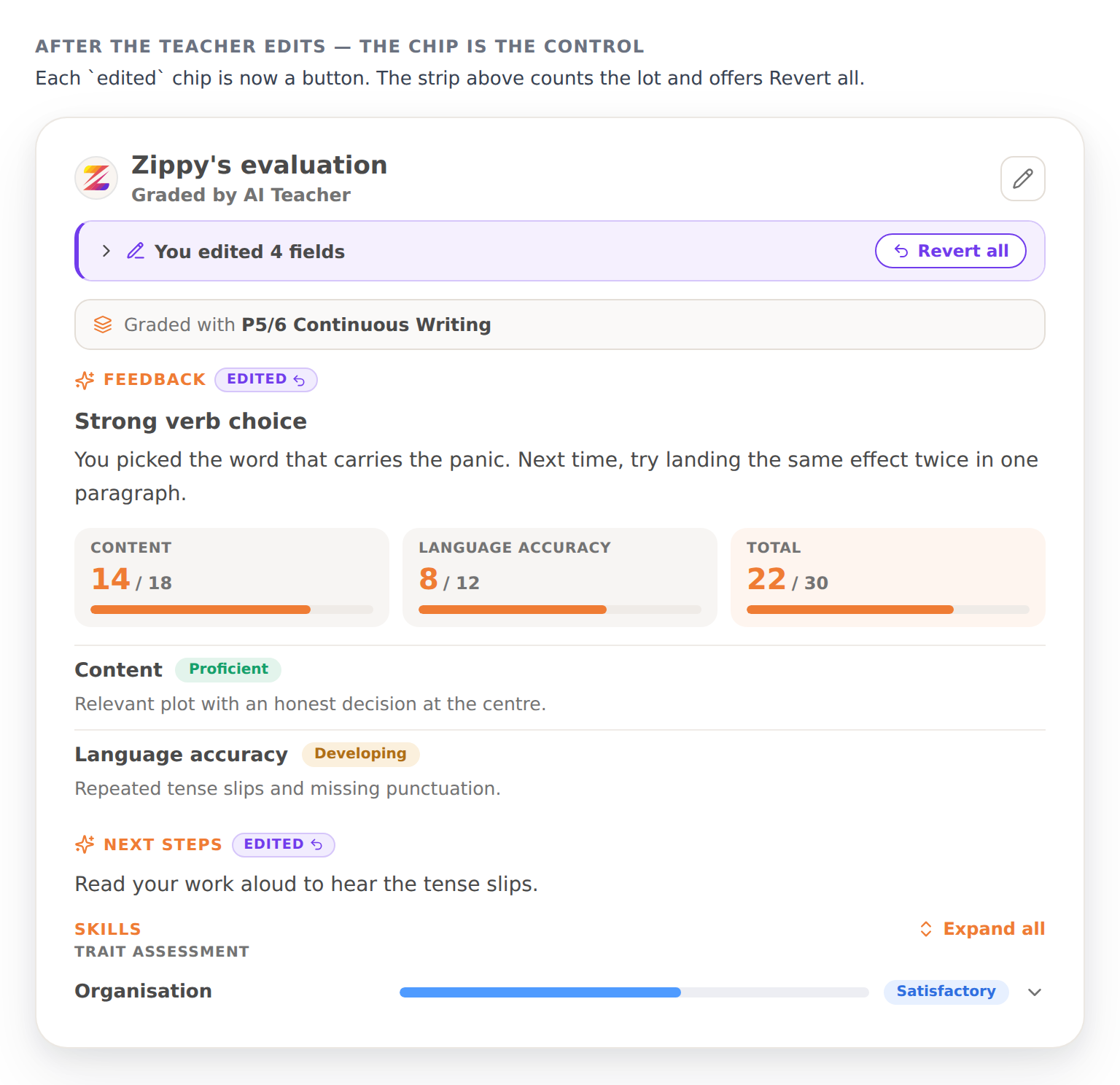
You edited 4 fields, with Revert all above and an EDITED chip on each one. Revert a mark and the totals move with it.
4. Nothing leaves the room until you press Release
Not the first draft, not the re-grade, not a comment you changed your mind about halfway through. While a piece is held, the student's own view has no feedback in it, because the server does not send any. It is not hidden behind a panel somewhere; it is simply not there yet.
And your students never see that you were involved. Not the EDITED chips, not what Zippy wrote first, not the timestamp. What goes out is the mark and the comment under your name, which is what a report has always been.
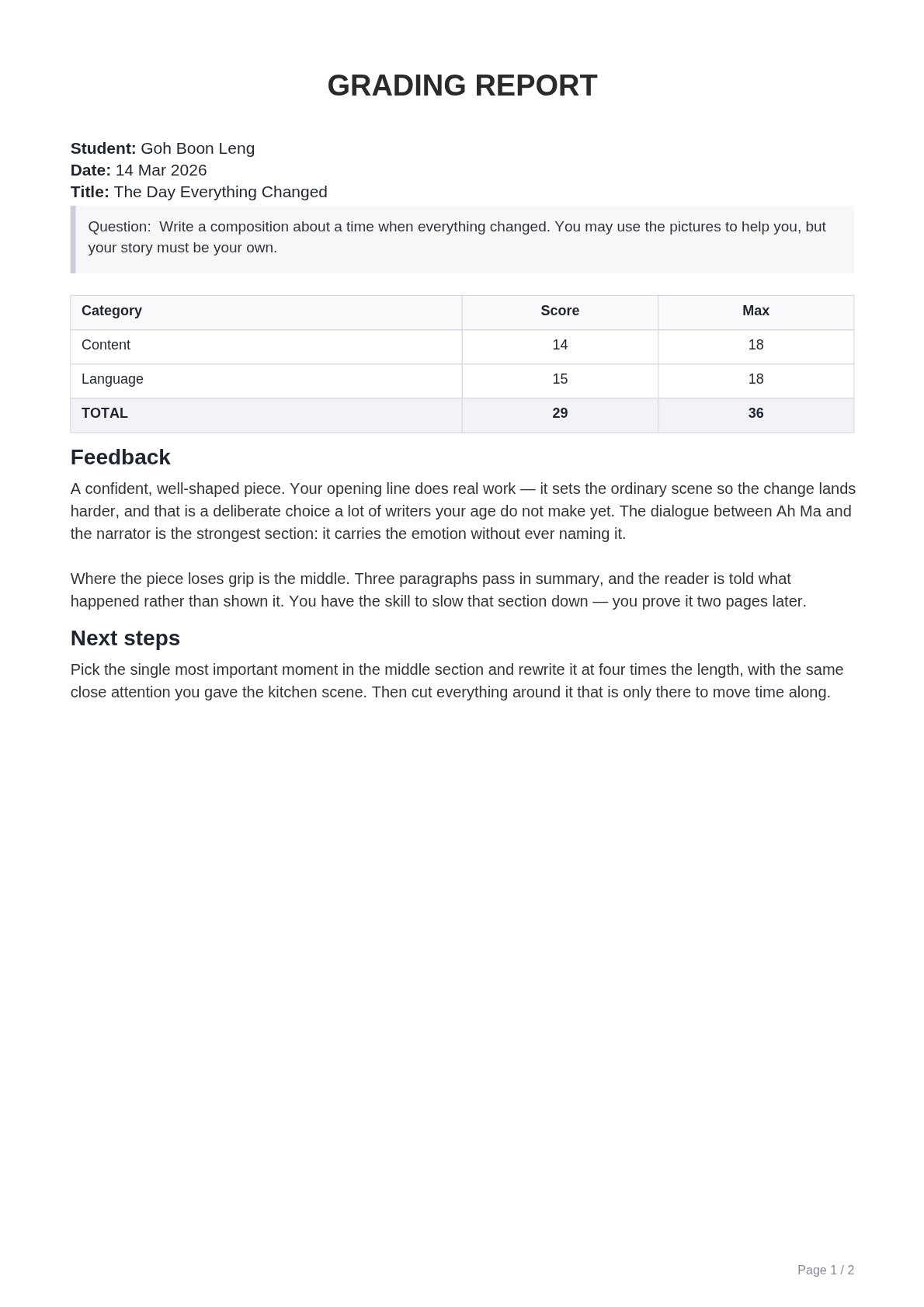
The two-page report a parent receives: scores by category, feedback and next steps on page one, the annotated script on page two.
Where the hours actually are
It is worth being straight about how much of a week marking actually is, because Singapore publishes the number.
TALIS 2024 surveyed about 3,500 teachers across all 145 public secondary schools here. They reported a 47.3-hour week against an OECD average of 41, with 6.4 hours of it spent marking and correcting student work.
Marking is not the biggest thing on that list, and it has been falling: about 7 hours in 2018, 6.4 now. Administration held steady at roughly 4 hours. What grew is lesson planning, student counselling, co-curricular activities and talking to parents.
So if a head of department tells you marking is not what eats the week, they are right, and Zippy does not touch most of the rest. What it changes is the first pass: thirty scripts read and commented in the time it takes to read three, with every mark still yours to set. Against 6.4 hours a week that is worth having, and it is not the whole week.
Setting it up, which is where the control actually starts
Everything above depends on the rubric being yours, and that is something you configure rather than something we ship. It lives under Grading, in three tabs.
Rubrics is the grid. Criteria down the side, each with a sentence saying what it covers; five bands across the top; and a descriptor you wrote in every cell. Tag a rubric by subject, level and category so the right one is offered for the right piece.
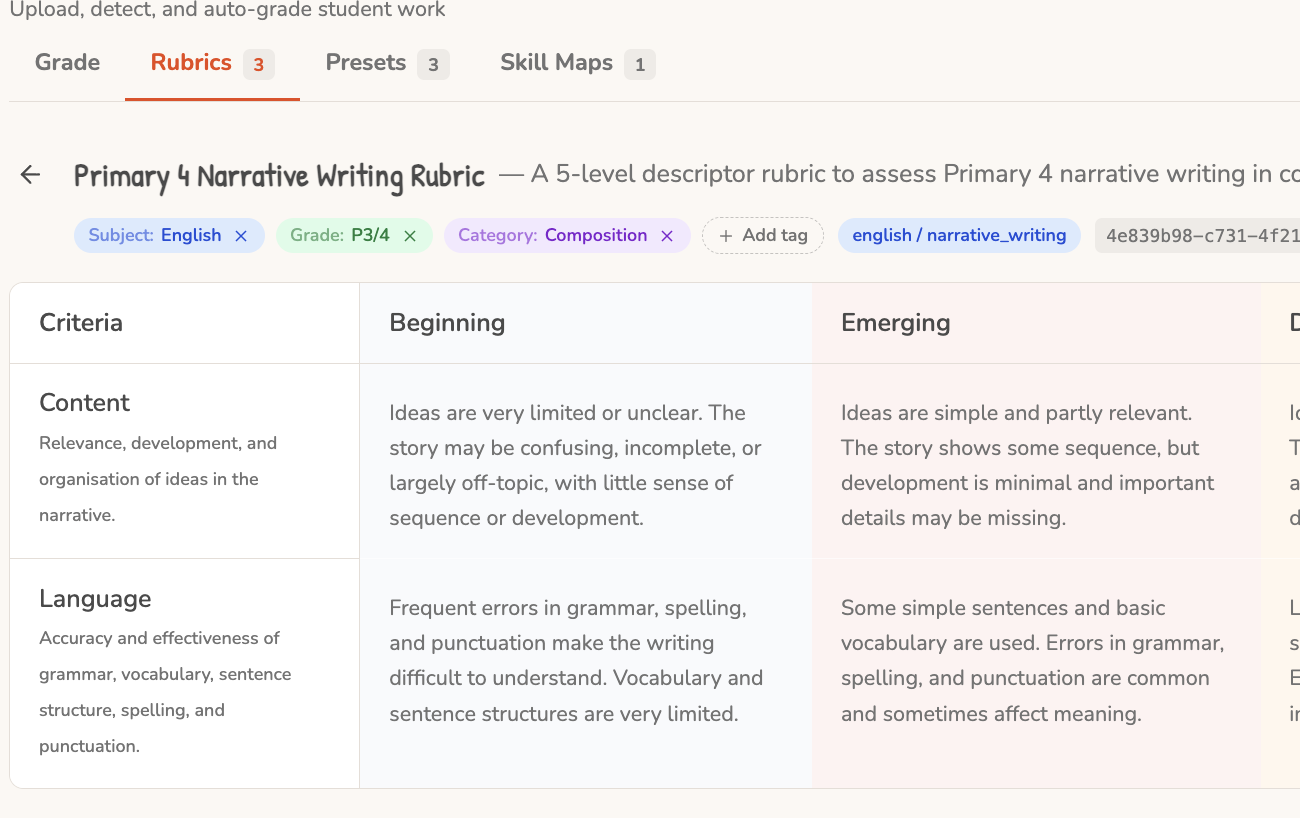
The Rubrics tab, with a Primary 4 narrative writing rubric open. Tagged by subject, level and category, so the right rubric is offered for the right piece. Content and Language are shown under two of the five bands.
Skill Maps is the finer grain underneath. One line per skill, grouped by trait, with a descriptor at each of the five levels. Ideas: Deepen a key moment is a skill and Ideas & Content is the trait it rolls into. This is what produces the per-skill lines on a marked piece.
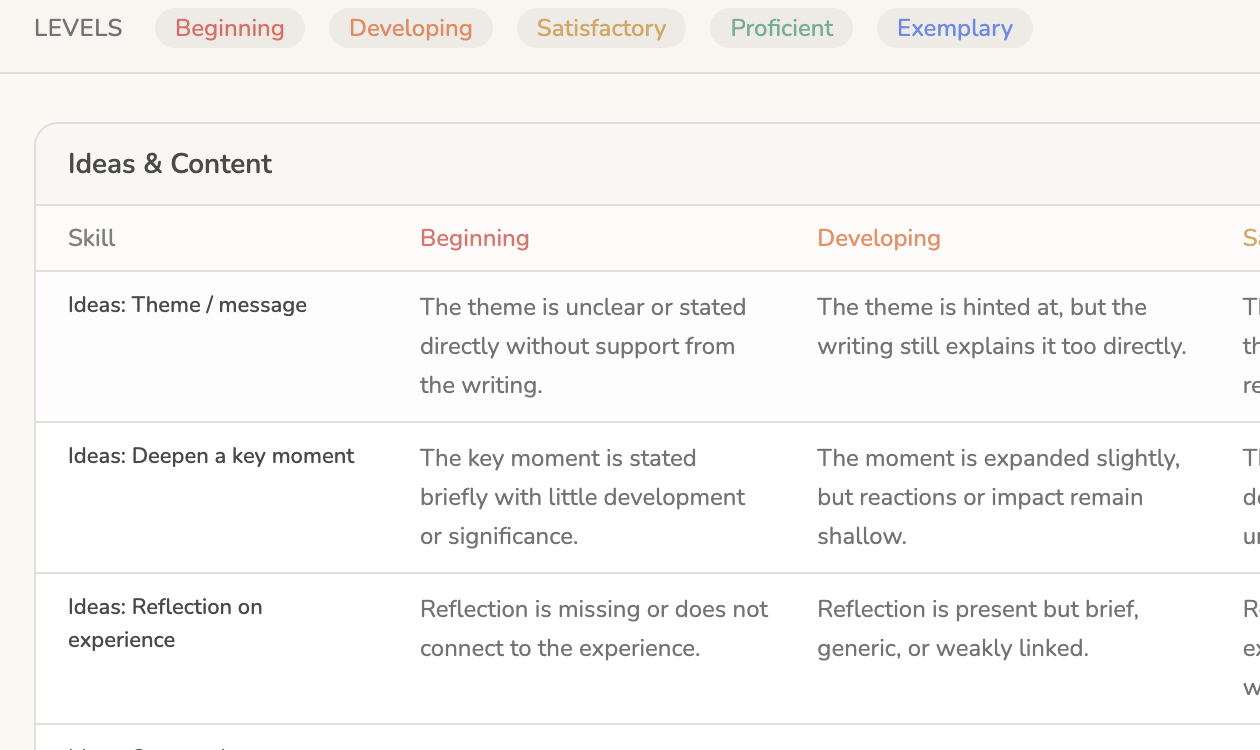
A skill map. Ten skills grouped under Ideas & Content, each written out across the five levels from Beginning to Exemplary.
Presets is where you say which of those a piece is marked against, and what else the run should do. Attach an existing rubric, or build an inline one from a skill map. Decide whether students receive spelling and punctuation corrections at all. There is a free-text Prompt box for the instructions that do not fit a grid: a house convention, the thing your P5s always get wrong, a quirk of your mark scheme. The grader is handed it verbatim.
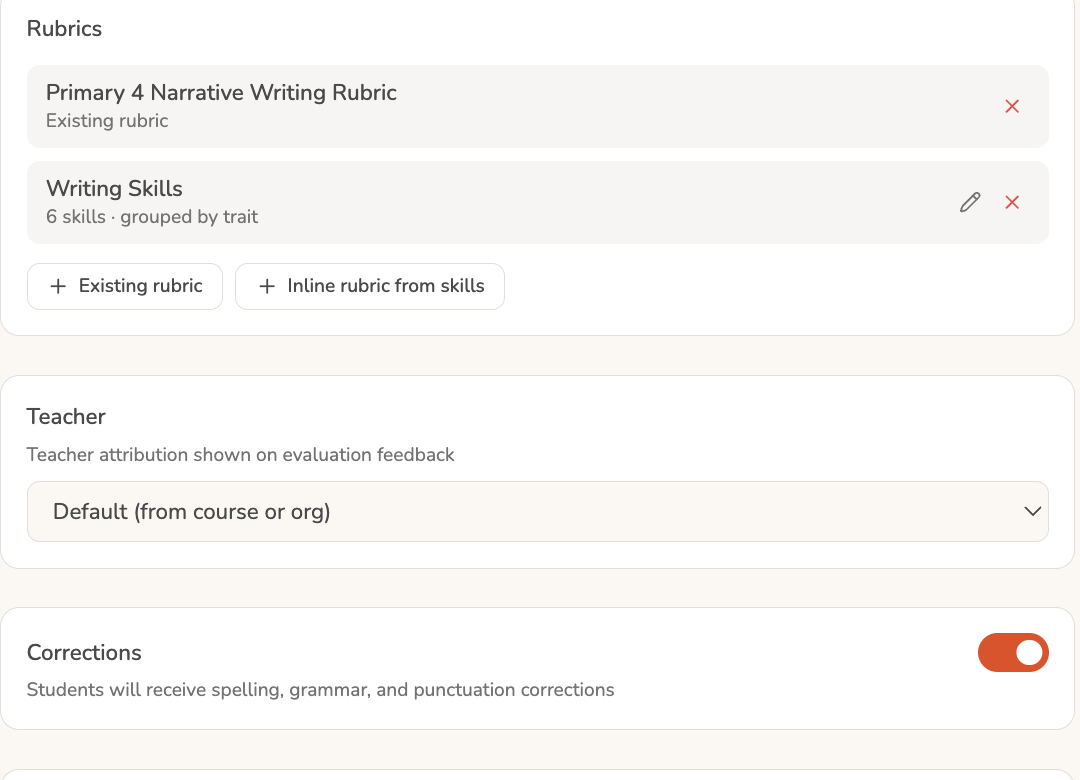
A grading preset. Which rubrics this activity marks against, whose name the feedback carries, and whether corrections reach the student at all.
That setup is where the 33.5% and the above-50% at the top of this post come apart. A generic marker is guessing at what good writing looks like in your centre. A marker holding your descriptors does not have to guess.
Back to the question
Does AI marking actually save you anything, or does it just move the work?
It moves the work if you have to supervise it. It helps if it holds your rubric, keeps your corrections, and waits for your word before anything reaches a child. That is the difference between a tool you check thirty times and one that lets you be the same teacher on script thirty as on script one, at eleven at night, when it counts most.
The rubric setup this depends on is covered in AI grading is only as good as the rubric behind it. For the mark schemes themselves, see how PSLE composition is marked and what makes up the 30 marks in O-Level Situational Writing. The four changes above are described in what's new.
Sources: AI/human marker agreement and rubric-supplied accuracy, arXiv 2504.13557. Teacher hours, TALIS 2024 via OECD Education GPS.